
SSH Man
Your coding agents work remotely. Stay connected to everything they touch.
Save each remote machine once, then open the apps your agents build, browse through the same network, inspect and edit their files, and run quick commands from your Mac.
- Signed macOS app
- Stable release
- CLI included
Experimental feature preview
See what your agents are building from your Mac.
Each screen keeps you on the same remote machine, whether you are opening its app, reviewing a handoff, checking a command, or choosing where a link belongs.
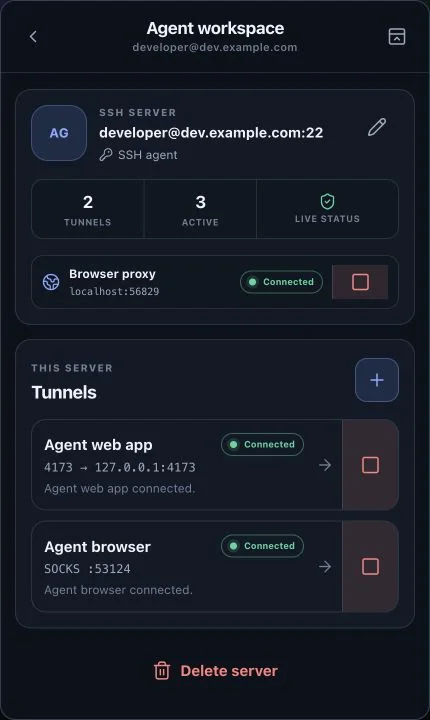
Agent workspace
Keep every path attached to its machine
See the app port, browser proxy, connection state, and reconnect behavior for one remote workspace.
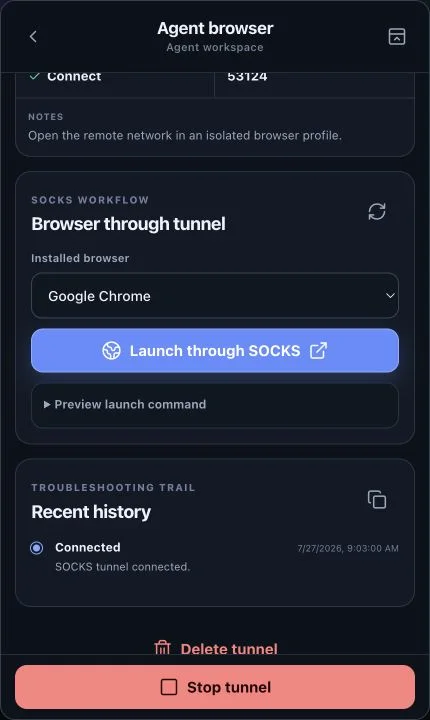
Browser through tunnel
Browse from inside the remote network
Choose an installed browser and launch it through a connected SOCKS tunnel with its own saved profile.
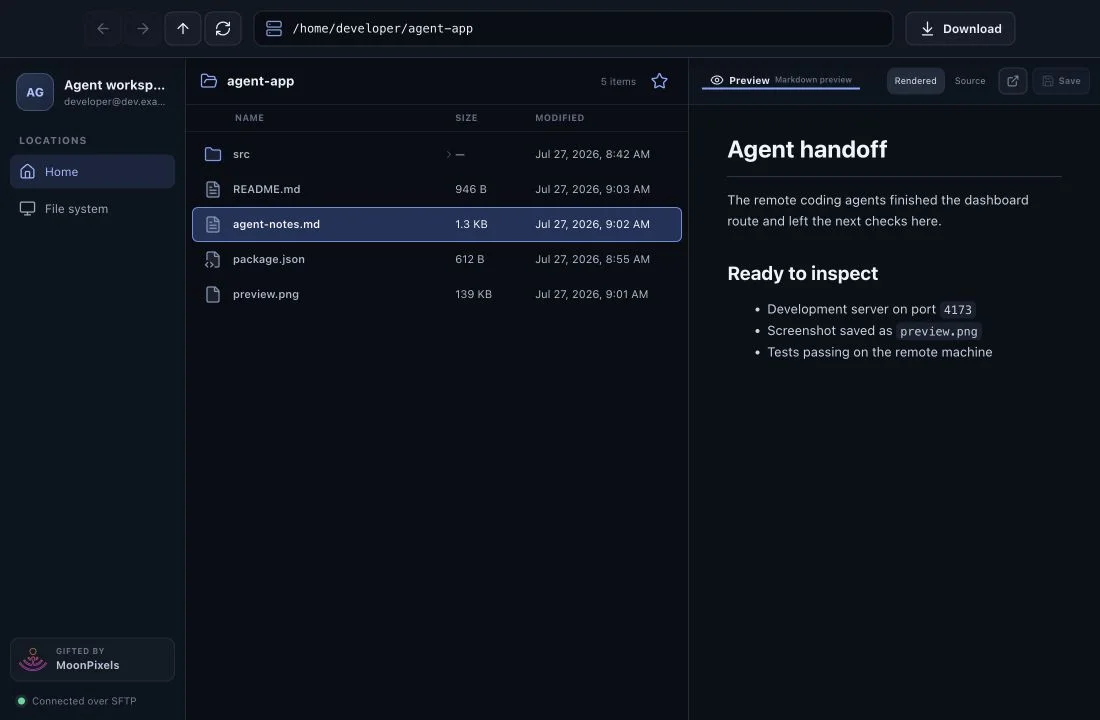
Remote Explorer
Review the artifacts your agents leave behind
Browse the remote tree, preview handoff notes and media, edit source, and move files without changing tools.
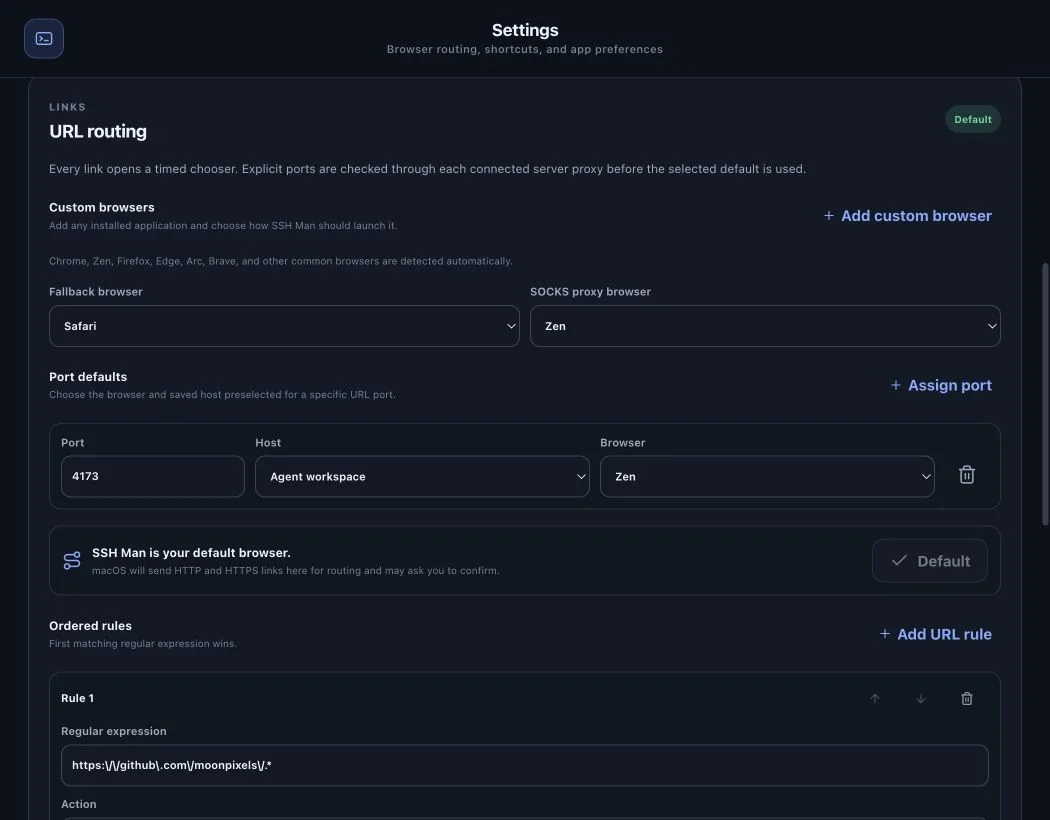
URL routing
Send every preview to the right workspace
Assign ports to saved machines and browsers, add ordered rules, and choose from a timed destination picker.
Built for agent-driven development
Give every remote machine a clear local doorway.
When coding agents run on remote machines, the work continues there. The app server, test results, screenshots, handoff notes, and internal tools all live behind that machine's SSH connection. SSH Man brings those touchpoints into one saved workspace.
Open a forwarded development server at a stable local port. Launch Chrome, Zen, Firefox, or another browser through the remote network. Inspect agent output in Explorer. Run a quick check on the same host. Each path stays tied to the machine where the work is happening.
Experimental feature preview
Stay in the loop without interrupting the work.
Move from an agent's preview to its files, network, and command output while the remote machine keeps doing the heavy lifting.
Open what your agents build
Give development servers, databases, debuggers, and internal tools named local forwards with stable ports, start-on-launch behavior, and automatic reconnects.
Browse from the same network
Launch common or custom browsers through SOCKS5 with a persistent profile for each machine, then switch between regular and remote browser sessions from the keyboard.
Send each link to the right workspace
Route macOS web links with a timed chooser, ordered rules, remote reachability checks, and saved machine-and-browser defaults for ports such as 3000 or 4173.
Inspect and edit remote output
Browse over SFTP, favorite paths, preview Markdown, HTML, images, and video, edit with Monaco or Vim mode, detach previews, and upload or organize files with familiar actions.
Run quick checks in place
Use saved server credentials to run commands with remote path completion, live output, stop controls, duration, status, and per-machine history.
- Shared app and CLI stateUse the same saved servers, tunnels, and sessions from either surface.
- Existing SSH trustConnect with your SSH agent or encrypted key and keep known-host verification.
- Live connection contextSee bound ports, status details, reconnect attempts, history, and diagnostics.
- Persistent working windowsKeep Explorer, commands, settings, and detached previews close to the machine they belong to.
A repeatable remote-agent loop
Connect once. Review every handoff.
- 01
Save the agent machine
Add its host, choose your SSH credentials, and name the services you expect to revisit.
- 02
Open the right surface
Forward the app, browse through its network, inspect the file tree, or run a focused command.
- 03
Keep the loop moving
Return to the same ports, profiles, files, and history for the next agent update or network change.
Install SSH Man
Put every remote agent machine one click away.
Homebrew installs the latest stable, signed, and notarized macOS app and links the full SSH Man CLI into your path.
brew tap ericwooley/homebrew-apps
brew install --cask ericwooley/apps/ssh-manRemote agents, closer at hand
Keep the work remote. Keep the workflow within reach.
Install SSH Man to give every coding-agent machine a saved path to its apps, files, commands, and network.
Install SSH Man